Paying for a PTE exam should be the simple part. Yet a card can fail at checkout, a bank may decline an international or high-value transaction, or a student may become unsure about the final amount just when the preferred test slot is available.
A PTE voucher gives you another way to pay. You purchase the voucher before completing the exam booking, receive a unique code, and apply that code during an eligible Pearson checkout. When the voucher matches the selected country, PTE test type and applicable exam fee, the amount covered by the code is adjusted at checkout.
PTENOTE makes the purchase part straightforward. You enter your name, email address and mobile number, select the relevant voucher package on the pricing page, complete the payment, and receive the voucher code through your registered WhatsApp number and Email address. PTENOTE normally delivers the code in about 30 seconds after a successful payment.
The voucher does not choose your exam date or book the test by itself. You still use your own myPTE account to select the correct exam, test centre, date and time. The voucher is entered only at the payment stage.
This guide explains the complete journey in simple language: what a PTE voucher is, what to check before buying one, how to purchase it from PTENOTE, where to redeem it, how to confirm that it worked, and what to do if the code is not accepted.
Quick Answer: How Does a PTE Voucher Work?
A PTE voucher is a prepaid code used to cover an eligible PTE exam payment. Instead of entering card details at Pearson checkout, you enter the voucher code in the available voucher or promo-code field.
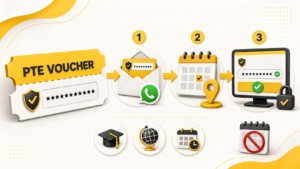
The full process is:
- Confirm the PTE test and country for which you need the voucher.
- Open the PTENOTE PTE Voucher page.
- Enter your name, email address and mobile number.
- Continue to pricing and select the correct voucher package.
- Complete the payment through PTENOTE.
- Receive the voucher code through WhatsApp and email.
- Sign in to your own myPTE account.
- Select the eligible test centre, date and time.
- Apply the voucher during Pearson checkout.
- Confirm that the payable amount has been adjusted before completing the booking.
Keep the PTENOTE payment receipt, order reference, WhatsApp message and email until your exam appointment has been confirmed. These records make it easier to get help if you enter the wrong code, choose an incompatible test or face a checkout error.
What Is a PTE Voucher?
A PTE voucher is a prepaid exam-payment code. It holds value for a particular type of eligible PTE booking and is applied during Pearson’s official checkout.
Think of it as a payment method prepared in advance. You buy the code first and use it later when you are ready to book a suitable exam appointment. Once Pearson accepts the voucher for the covered booking, you do not need to make the same covered payment by card.
A voucher is not the same as:
- A test appointment. It does not reserve a date, time or test centre.
- A reusable balance. A code is normally intended for one eligible exam payment.
- A rescheduling credit. It cannot be assumed to cover a later rescheduling fee.
- A universal PTE code. Country, test type and expiry restrictions can apply.
The distinction matters. Some students buy a voucher and expect an exam slot to be booked automatically. In reality, purchasing the voucher and booking the test are two connected but separate steps. First you receive the payment code. Then you select the appointment in your myPTE account and redeem the code at checkout.
Why Do Students Buy a PTE Voucher?
The main reason is payment convenience. A student can arrange the exam payment before reaching Pearson checkout instead of relying on a card transaction at that moment.
A voucher may help when:
- The current PTENOTE voucher offer provides a saving compared with the direct exam fee.
- Your card has previously failed during an exam payment.
- You do not want to enter card details at the final checkout.
- You want to book a PTE exam at a discounted price.
The saving should not be the only thing you check. Compare the final price together with the voucher’s eligibility, expiry, delivery, invoice and support.
PTE Voucher or Direct Card Payment: Which Is Better?
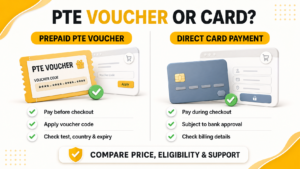
A PTE voucher can be a better payment option when you want to reduce your exam-booking cost and avoid card-related problems during Pearson checkout.
Benefits of Buying a PTE Voucher
- Book your exam at a lower price: PTENOTE voucher packages may provide substantial savings compared with paying the regular exam fee directly during Pearson checkout.
- Get free PTE mock tests: PTENOTE includes free mock-test access with the voucher, helping you practise before your exam without paying separately for the included tests.
- Avoid card-payment failures: Apply the prepaid code at checkout instead of depending on card approval at the final step.
- No card details required at Pearson checkout: Once an eligible voucher is accepted, you do not need to make the covered exam payment by card.
- Buy now and book later: Receive the code through WhatsApp and Email, then use it before its expiry.
- Get support when needed: PTENOTE can help with voucher delivery or redemption questions connected to your order.
What Happens with Direct Card Payment?
When paying directly by card, you normally pay the exam fee displayed during Pearson checkout without receiving the saving available through a PTENOTE voucher package. The payment is also subject to card limits, bank approval, billing details and transaction processing.
Before choosing, compare Pearson’s current exam fee with PTENOTE’s final voucher price. Also confirm the voucher’s test type, country, expiry date and current terms. The exact saving can change, but an eligible PTENOTE voucher may help you book the same covered exam at a lower cost.
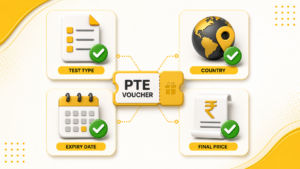
Before You Buy: Confirm These Four Details
Most voucher problems can be avoided before payment. Confirm these details first.
1. The exact PTE test
Check whether you need PTE Academic, PTE Academic UKVI or PTE Core. Do not assume that a voucher for one test will automatically work for another.
PTE Academic is commonly used for global study and other accepted purposes. PTE Academic UKVI is used for specific UK visa routes, while PTE Core is used for Canadian permanent-residency and citizenship applications. Your university, visa adviser or immigration instructions should identify the test you need.
If the requirement is unclear, confirm it before purchasing the voucher. Selecting the wrong test can leave you with a code that does not match your intended booking.
2. The booking country
A voucher supplied for use in India should be treated as an India voucher. It should not be assumed to work when another country is selected in the Pearson booking flow.
The test centre and booking country must match the voucher’s eligibility. This restriction matters even if the same PTE test is available in several countries.
3. The exact expiry date
The exact voucher expiry date is shown in the package details before you complete your purchase. After successful payment, PTENOTE also sends the expiry information with your voucher code through WhatsApp and Email.
Check this date before buying and keep the confirmation message for reference. Choose a voucher whose remaining validity covers the date on which you expect to book your PTE exam.
4. The current price and terms
PTE exam fees and voucher offers can change. Check the current PTENOTE voucher price on the pricing page when you are ready to pay.
Also review what the package covers, whether taxes or other charges are included, how the code will be delivered, and the latest PTENOTE refund policy.
How to Buy a PTE Voucher from PTENOTE
Buying a voucher from PTENOTE begins on the PTENOTE website and ends with the code being delivered to your registered contact details.
Step 1: Open the PTENOTE PTE Voucher page
Visit the PTE Voucher page. Read the current voucher information to understand how the voucher works, how it is delivered and where it can be redeemed.
Step 2: Enter your contact details
Provide:
- Your name.
- Your active mobile number.
- Your active email address.

Check the spelling before continuing. Then click “Book PTE Exam.” When the popup appears with mobile number field, enter your mobile number and continue with “View Pricing.”
Use contact details you can access and check them before continuing. A typing mistake can delay delivery even when the payment succeeds.
Step 3: Review the voucher packages on the pricing page
The voucher-only packages are:
- Early Bird
- Essential
- PTE Core Voucher
With a voucher package, PTENOTE sends the voucher code to your registered WhatsApp number and email address after successful payment. You then apply the code yourself while booking an eligible exam through Pearson.

You may also see these complete exam-booking packages:
- Foundation
- PTE Core Booking
These are not voucher-only packages. They are for students who want PTENOTE’s automated system to complete the exam-booking process in just 60 seconds using their preferred test type, city, centre, date and time. Read our complete PTE exam-booking guide to understand how that process works.
Before choosing any package, check the package name, supported PTE test, country, current price, voucher validity, delivery time and the latest refund conditions. If you only need a voucher, select Early Bird, Essential or PTE Core Voucher according to your exam requirement. If you want PTENOTE to complete the exam booking for you, review the Foundation or PTE Core Booking package instead.
Step 4: Complete the payment
Pay through the checkout connected to the official PTENOTE flow. Confirm that the merchant or payment recipient belongs to the same verified business responsible for delivering the voucher.
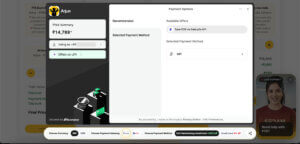
After payment, save the confirmation screen, transaction reference, PTENOTE order information and GST invoice. Then check WhatsApp and Email.
Do not publicly share screenshots containing the full voucher code, payment reference, phone number or email address.
Step 5: Receive the voucher through WhatsApp and Email
After a successful payment, PTENOTE sends the PTE voucher code to the registered WhatsApp number and Email address. Delivery normally takes about 30 seconds.
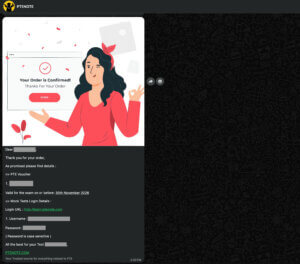
Confirm that both messages contain the expected voucher and order information. Keep them until the exam booking is confirmed.
If it does not arrive, check the submitted details, WhatsApp and Email spam folder. Contact PTENOTE with the transaction and order reference before making another payment.
How to Redeem a PTE Voucher on Pearson
Once you have the code, the redemption takes place during an eligible Pearson booking in your own myPTE account.
Step 1: Sign in or Create your myPTE account
Open the official Pearson PTE booking page and sign in. Use your own account and keep control of its password, email and personal information.
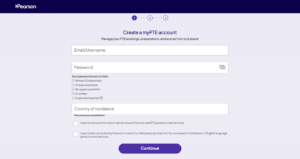
Do not hand over your login details to an unknown seller. A voucher can be used as payment without another person controlling your account.
Step 2: Select the correct PTE test
Choose the exam that matches the voucher:
- PTE Academic.
- PTE Academic UKVI.
- PTE Core.
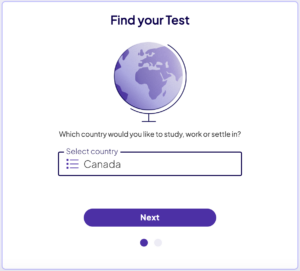
A mismatch between the selected exam and the voucher can cause the code to be rejected.
Step 3: Choose the test centre, date and time
Search for the preferred city or test centre and review the available appointments. Choose a date and time that fit your deadline, preparation and travel plan.
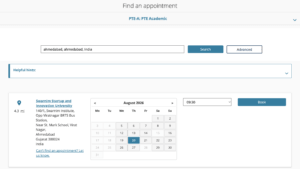
Buying a voucher does not reserve a slot. Availability can change as other students book or cancel appointments. Your chosen slot is secured only when the booking has been completed and officially confirmed.
Step 4: Confirm and verify your details
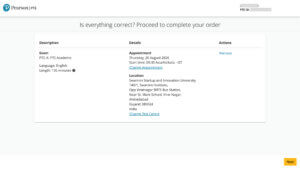
Review the candidate name, exam, centre, date and time before payment. The account details should match the acceptable identification you will present on test day. Correct any mistake before applying the voucher.
Step 5: Enter the PTE voucher code
Locate the voucher or promo-code field available during the eligible checkout. Copy the code carefully from the PTENOTE WhatsApp message or Email.
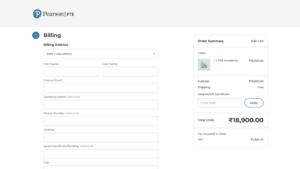
Avoid spaces, confused characters, the wrong test or country, and posting the code publicly.
Apply the code and wait for the checkout to update.
Step 6: Check the payable amount
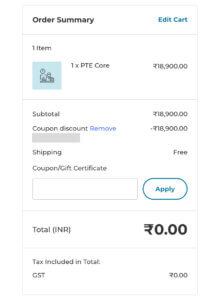
When the voucher covers the selected eligible exam fee, the amount payable should be adjusted to Zero. Check the order summary and displayed total before continuing.
Step 7: Complete and verify the booking
Finish the checkout and wait for official confirmation. Check:
- The appointment in your myPTE account.
- The confirmation email.
- The candidate name.
- The PTE test type.
- The test centre.
- The date and time.
A successful voucher application is not the final proof of an appointment. The booking is complete when the appointment is officially confirmed and appears in the account.
What Does “PTE Voucher Delivery in About 30 Seconds” Mean?
The 30-second message refers to PTENOTE’s normal voucher delivery after successful payment. It does not include selecting a test centre and completing the Pearson appointment.
The journey has two parts: PTENOTE handles the purchase and code delivery; you then select the appointment and redeem the code in myPTE.
The first part is automated for quick delivery. The second part depends on your test selection, available appointments and the time you take to review the booking.
Payment verification, incorrect contact details or technical issues can occasionally affect delivery. Contact PTENOTE with the order reference instead of paying again.
How Long Is a PTE Voucher Valid?
The exact expiry date is shown in the package details before payment. After your purchase is completed, PTENOTE also sends the expiry information with the voucher through your registered WhatsApp number and email address.
Check the expiry date before buying and keep the delivery messages with your order record. Make sure the voucher remains valid until the date on which you expect to book your PTE exam.
Redeem the code before its stated expiry because an expired voucher generally cannot be extended. If the expiry information is unclear, contact PTENOTE before using the code.
Can a PTE Voucher Be Transferred to Another Student?
Confirm transferability before giving a code to someone else. An unused and unexpired voucher may be transferable when:
- PTENOTE confirms that the specific code is eligible.
- The other student needs the same PTE test type.
- The booking country matches the voucher.
- The code has never been applied or redeemed.
- The transfer follows the supplied terms.
Do not send the code first and ask later. If PTENOTE confirms the transfer, share it privately and keep the original purchase record.
What Is the Refund Policy for a PTE Voucher?
Refund eligibility depends on the voucher’s condition, remaining validity and the latest PTENOTE terms. Do not rely on an old percentage from a message or third-party post.
Read the current PTENOTE Refund Policy before purchasing and again before requesting a refund.
An unused code may be considered under the current PTENOTE conditions. A redeemed code is no longer unused, and cancelling an appointment does not automatically reactivate it. Cancellation or rescheduling of a booked test follows the applicable Pearson policy.
Keep the order reference and payment record because PTENOTE may need them to verify the purchase and code status.
Can a Voucher Pay a PTE Rescheduling Fee?
Don’t assume that the original voucher can pay a rescheduling charge. A PTE voucher is intended for the eligible exam payment covered by that code, not for every later fee associated with the appointment.
Before changing a confirmed exam, check the current Pearson cancellation and rescheduling policy, review the applicable timeline and confirm any amount payable.
The original code cannot simply be reused after successful redemption.
How Do I Know a PTE Voucher Is Genuine and Safe?
A genuine PTE voucher should work through Pearson’s official checkout for the eligible test, country and validity period. You should remain in control of your own myPTE account throughout the booking.
Before paying, check the legal business name, website, contact details, responsible people, address, payment recipient, GST invoice, voucher eligibility, delivery, validity, refund-policy link and after-sales support.
PTENOTE is operated by Sedani Digital Pvt Ltd and has worked with PTE students since 2016. The website provides public business, office and support details, and PTENOTE keeps the form, payment, order and voucher delivery connected to the same service.
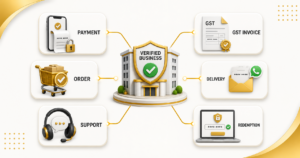
Keep the payment trail connected
Be careful when one person collects the payment but another unrelated person promises to deliver the voucher. The merchant name, order, invoice, delivery message and support contact should lead back to the same verified business.
Keep proof without exposing the code
Save the payment receipt, transaction reference, order confirmation, GST invoice, delivery messages, written terms and screenshots of any error.
When asking for support, hide most of the voucher code unless the verified support team specifically needs it through a private channel.
Warning Signs of an Unsafe Voucher Seller
A large discount is not proof that an offer is genuine. Slow down if a seller:
- Works only through an anonymous WhatsApp or Telegram account.
- Has no clear website, office, legal business name or responsible person.
- Changes the price during a call and asks for payment to an unrelated QR code.
- Refuses to provide a GST invoice.
- Asks for your myPTE password.
- Will not confirm the voucher’s country, test type or expiry.
- Pressures you to pay without showing the terms.
- Sends a code without an order or payment record.
A booking connected to an unauthorized or disputed payment may be cancelled. Pay only when you understand who receives the money, supplies the code and remains responsible if it is rejected.
Paid a Seller but Did Not Receive a GST Invoice?
Ask for the invoice in writing. Keep the payment proof, merchant or QR details, order information, seller messages, promised service, and any voucher or booking evidence.
PTENOTE accepts eligible reports about suspicious PTE sellers. A verified report may qualify for a reward of up to ₹10,000, subject to the published terms and conditions. The evidence must be genuine and sufficient for review.
Do not publish private documents or a complete voucher code publicly. Share evidence only through a verified support channel.
What Should I Do If My PTE Voucher Code Does Not Work?
A rejected code does not always mean it is invalid. The problem may be a typing error or eligibility mismatch.
Check these points in order:
- Copy the code again: Remove accidental spaces before or after it.
- Check similar characters: Make sure letters and numbers have not been confused.
- Confirm the country: Verify that India is selected when using an India voucher.
- Confirm the PTE test: Check that the selected exam matches the voucher package.
- Check the expiry: Use the exact expiry information delivered with the code.
- Check previous use: Confirm that the code was not applied to another booking.
- Review the checkout: Make sure you are entering it in the correct field.
- Capture the complete error: Take a screenshot without exposing the code publicly.
- Contact PTENOTE: Send the order reference and error through a verified support channel.
If Pearson appeared to accept it but no appointment is visible, check myPTE, email and checkout status before trying another payment. Do not repeatedly enter the code across different accounts.
Common PTE Voucher Mistakes to Avoid
- Buying before confirming the test: Check whether you need PTE Academic, PTE Academic UKVI or PTE Core.
- Assuming it works worldwide: An India voucher should not be treated as a worldwide code.
- Confusing purchase with booking: Receiving the code does not reserve an appointment.
- Entering incorrect contact details: Check the WhatsApp number and Email before payment.
- Sharing the code publicly: Treat it like a prepaid payment method.
- Ignoring the expiry: The exact date supplied with your code controls its use.
- Paying an unrelated account: Payment, invoice, delivery and support should connect to the same business.
- Deleting records too early: Keep them until the appointment is confirmed.
- Assuming cancellation restores the code: A redeemed voucher cannot simply be reused.
PTE Voucher FAQs
What is a PTE voucher?
A PTE voucher is a prepaid code applied during an eligible Pearson checkout to cover the exam payment associated with that code.
How can I buy a PTE voucher online from PTENOTE?
Open the PTENOTE PTE Voucher page, enter your name, email and mobile number, continue to pricing, select the correct voucher package and complete payment.
How quickly will PTENOTE deliver my voucher?
PTENOTE normally sends the voucher through WhatsApp and Email in about 30 seconds after successful payment.
Where do I receive the PTE voucher code?
The code is sent to the WhatsApp number and Email address entered in the PTENOTE form.
Where can I use the PTE voucher?
Redeem it during an eligible Pearson checkout in your own myPTE account. The selected test and country must match the voucher.
Does a PTE voucher book my exam automatically?
No. The voucher covers an eligible payment. You still select the test centre, date and time and complete the booking in your myPTE account.
Can one voucher work for PTE Academic, UKVI and PTE Core?
Do not assume it will. Confirm that the package matches the exact PTE test you need before paying.
Can I use an India PTE voucher outside India?
An India voucher should be used for an eligible booking with India selected as the test country. Do not assume it will work elsewhere.
How long is a PTENOTE PTE voucher valid?
PTENOTE vouchers can provide up to 11 months of validity. The exact expiry date delivered with the individual code applies.
Can I use the same voucher more than once?
No. A voucher is normally intended for one eligible exam payment and cannot be reused after successful redemption.
Can another student use my PTE voucher?
Ask PTENOTE before transferring it. Any transfer depends on the code remaining unused and unexpired, matching the other student’s test and country, and being eligible for transfer.
Can I get a refund for an unused voucher?
Eligibility depends on the current PTENOTE refund conditions. Read the latest refund policy rather than relying on an old quoted percentage.
Can I use the voucher to pay a rescheduling fee?
Do not assume that a PTE voucher can pay a rescheduling charge. Check Pearson’s current policy and the payment shown when changing the appointment.
Why is my PTE voucher being rejected?
Common causes include typing mistakes, spaces, the wrong country, the wrong PTE test, expiry, previous redemption or a temporary checkout issue.
What if I paid PTENOTE but did not receive the code?
Check WhatsApp, Email spam and the contact details used in the form. Then contact PTENOTE with the order and transaction reference before making another payment.
How do I know the voucher worked?
After applying it, check that the covered amount is adjusted at checkout. Then complete the booking and confirm that the appointment appears in myPTE.
Is it safe to give a voucher seller my myPTE password?
You should remain in control of your own myPTE account. A voucher can be applied as payment without giving an unknown seller your password.
What proof should I keep after buying a voucher?
Keep the payment receipt, transaction reference, GST invoice, order confirmation, voucher-delivery message and any support communication until the booking is confirmed.
Buy the Right Voucher, Then Redeem It Carefully
A PTE voucher can make exam payment easier, but only when the code matches the booking you actually need.
Start by confirming the exam and country. Buy through the official PTENOTE PTE Voucher page, use accurate contact details, review the package and complete the payment. PTENOTE will send the code through WhatsApp and Email after successful payment.
Then move to your own myPTE account. Select the correct test centre, date and time, apply the code at checkout, check the payable amount, and complete the appointment. Keep every record until the official booking confirmation is visible.
The safest voucher is not simply the one with the biggest advertised discount. It is the one whose seller, payment, invoice, eligibility, expiry, delivery and support you can verify.
Buy your PTE voucher Now!